Barcode size for printing: X-dimension, magnification and printer dpi
Updated October 12, 2026 · 8-minute read · 8 sections
Barcode size for printing is decided by one number, the X-dimension, which is the width of the narrowest bar. For EAN-13 and UPC-A it has to land between 80 % and 200 % of 0.33 mm, and on a real printer that means picking a whole number of printer dots, not a size that merely looks right on screen.
Most codes that fail at the till fail for boring reasons: a few percent too small, a trimmed quiet zone, or a PNG that a layout program resampled. All three are avoidable once you know which numbers to read off the label file before the print run.
Barcode size for printing starts with the X-dimension
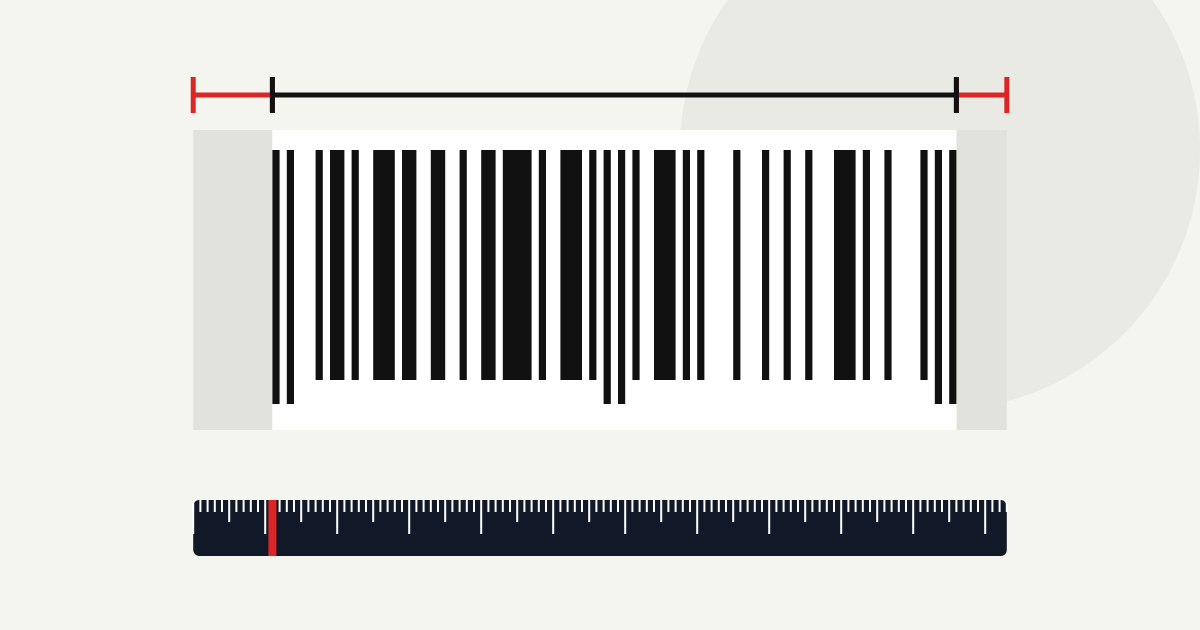
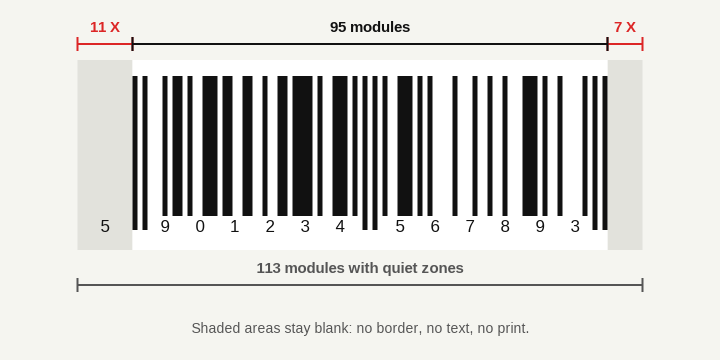
A barcode is a row of modules. A module is one narrow bar or one narrow space, and every bar and space in the symbol is a whole multiple of it. The width of one module is the X-dimension, written X. Everything else is arithmetic on X: an EAN-13 has 95 modules between its guard bars, so the symbol is 95 × X wide before the margins are added.
Some printers and label shops quote X in mils, thousandths of an inch. One mil is 0.0254 mm, so the nominal EAN/UPC module of 0.33 mm is 13 mils. When a printer spec says "10 mil", it means 0.254 mm.
Set the module width first and let the width follow. If you start from the width ("it has to fit in 30 mm"), you end up with a fractional module that no printer can draw, and the scanner pays for the rounding.
The 80 % to 200 % rule for EAN-13 and UPC-A
Retail EAN and UPC symbols are specified at a nominal size, and the symbol may be scaled between 80 % and 200 % of it. The nominal UPC-A module is 0.33 mm and its nominal symbol height is 25.9 mm; the height scales with the width (UPC summary). The generator draws the bars of EAN-13 and UPC-A 22.85 mm high at 100 % (EAN-8: 18.23 mm) and prints the digits below them. Widths below include the quiet zones: 113 modules for EAN-13 and UPC-A, 81 for EAN-8.
| Magnification | X (mm) | X (mils) | EAN-13 / UPC-A width (mm) | EAN-8 width (mm) | EAN-13 / UPC-A bar height in the tool (mm) |
|---|---|---|---|---|---|
| 80 % | 0.264 | 10.4 | 29.83 | 21.38 | 18.28 |
| 100 % | 0.330 | 13.0 | 37.29 | 26.73 | 22.85 |
| 150 % | 0.495 | 19.5 | 55.94 | 40.09 | 34.28 |
| 200 % | 0.660 | 26.0 | 74.58 | 53.46 | 45.70 |
My rule of thumb: aim for 100 % to 150 % whenever the pack allows it. Eighty percent is a legal floor, not a target. At the floor you have no margin left for ink spread, a rough board or a scanner that is a little slow, and that is where the "it scanned in the office but not at the store" stories come from. Below 80 % the code is simply out of specification.
Quiet zones: the blank margin counts as part of the barcode
The quiet zone is the empty strip on each side that tells the scanner where the first bar starts. It is part of the symbol, not decoration, and it must be blank: no border, no text, no fold line, no printed colour.
| Symbol | Left | Right | At 100 % (mm) |
|---|---|---|---|
| EAN-13 | 11 X | 7 X | 3.63 / 2.31 |
| UPC-A | 9 X | 9 X | 2.97 / 2.97 |
| EAN-8 | 7 X | 7 X | 2.31 / 2.31 |
| UPC-E | 9 X | 7 X | 2.97 / 2.31 |
| ITF-14 | 10 X | 10 X | depends on X |
| Code 128 | 10 X | 10 X | depends on X |
The UPC and Code 128 values are summarised on Wikipedia (Code 128); the EAN-13 and EAN-8 values are in the GS1 General Specifications, which is where your packaging supplier should be looking too. The EAN-13 digit on the far left is printed in the left margin on purpose, so the quiet zone is larger than the UPC one.
Bar height: do not trim it to fit the pack
Scanners sweep a line across the symbol, usually at some angle. Tall bars give that line room to cross every bar. The temptation on a small box is to cut the height and keep the width, because the width is what the eye measures. I would rather drop the whole symbol to 80 % than chop the bars, since a truncated code fails more often than a slightly smaller full one. For EAN and UPC the generator warns when the bars are shorter than the height that goes with your magnification. For other symbols it warns below 15 % of the symbol width or 6.35 mm, whichever is larger. ITF-14 gets a bearer frame, 3 X thick, around the bars and the quiet zones.
Snapping the module to printer dots
A printer lays down whole dots. At 300 dpi one dot is 0.0847 mm, so a 0.33 mm module is 3.9 dots, which the driver rounds to 4 or, worse, renders as a mixture of 3 and 4. Bars of uneven width are what ruin the ratios the scanner relies on. Choose the dot count yourself so every bar is the same integer multiple.
| Printer | Dots per module | X (mm) | X (mils) | Magnification | EAN-13 width (mm) |
|---|---|---|---|---|---|
| 203 dpi thermal | 2 | 0.2502 | 9.9 | 75.8 % | 28.28 (too small) |
| 203 dpi thermal | 3 | 0.3754 | 14.8 | 113.7 % | 42.42 |
| 203 dpi thermal | 4 | 0.5005 | 19.7 | 151.7 % | 56.56 |
| 300 dpi | 3 | 0.2540 | 10.0 | 77.0 % | 28.70 (too small) |
| 300 dpi | 4 | 0.3387 | 13.3 | 102.6 % | 38.27 |
| 300 dpi | 5 | 0.4233 | 16.7 | 128.3 % | 47.84 |
| 600 dpi | 7 | 0.2963 | 11.7 | 89.8 % | 33.49 |
| 600 dpi | 8 | 0.3387 | 13.3 | 102.6 % | 38.27 |
Look at the two thermal lines. A 203 dpi label printer cannot do 100 %: two dots is 75.8 %, which is below the floor, and three dots is 113.7 %. Three dots is the right answer, and it makes the finished EAN-13 about 42 mm wide with margins. Likewise a 300 dpi laser at three dots lands at 77 %, so use four. This is the reason the barcode generator asks for your printer dpi and shows the real X and magnification, on a gauge from 80 % to 200 %, before you export. You can type X in per cent, millimetres or mils; the value snaps to whole dots, and the dot count is shown.
Thermal printers and laser toner both spread a little. If bars come out fat, the fix is a small bar width reduction in the artwork or a lighter print setting, not a smaller module.
Why scaling a PNG in Word or Canva breaks a barcode
A PNG barcode with 3-pixel modules, dropped into a document and stretched to 133 %, has modules of 3.99 pixels at print resolution. The layout program resamples, the edges turn grey, and some bars end up a pixel wider than their neighbours. The code looks fine on screen and fails on paper.
- Prefer vector. SVG or PDF bars are rectangles with exact coordinates, so any size is crisp.
- If you must use PNG, export it at the printer's own dpi with whole-dot modules, then place it at 100 % with no resizing handles touched. The generator writes that dpi into the PNG file, so most layout programs place it at its real size.
- Lock the aspect ratio. Squeezing a code in one direction changes the bar-to-space ratios the scanner depends on.
- Print from the PDF, with "actual size" selected. "Fit to page" silently rescales everything.
Code 128 and other labels you design yourself
For internal labels there is no 80-to-200 rule, only your scanner and your distance. My own floor for laser handhelds is a module of about 0.25 mm (10 mils); phone cameras and distant shelf scanning want more. Width follows from the symbol count:
| Data | Symbols | Modules | Width (mm) |
|---|---|---|---|
| 8 digits (set C) | 6 | 99 | 25.15 |
| 12 digits (set C) | 8 | 121 | 30.73 |
| 16 digits (set C) | 10 | 143 | 36.32 |
| 10 characters (set B) | 12 | 165 | 41.91 |
| 20 characters (set B) | 22 | 275 | 69.85 |
Digit runs in set C take half the room, which is why a long numeric code is much shorter than the same text with a letter in it. If a label is too wide, shorten the data before you shrink the module. Which symbol suits which job is covered in which barcode type do I need.
Test-scan before the print run
- Print one sheet on the real printer and the real label stock, not a sample on copy paper.
- Scan it with the scanner that will be used, from a normal working distance and at a slight angle.
- Compare the decoded digits with the number you intended. A clean scan of the wrong number is the most expensive failure.
- Check the digit itself while you are there. The method is in how to calculate a barcode check digit.
- Re-scan after lamination, curved surfaces or folds if the product will have them.
Questions and answers
What is the minimum size of an EAN-13 barcode?
80 % of nominal, which is a module of 0.264 mm and a width of 29.83 mm including quiet zones. I would aim for 100 % or more so there is room for ink spread.
What size should a barcode be printed?
For EAN-13 and UPC-A, between 80 % and 200 % of the nominal 0.33 mm module, using a whole number of printer dots. For internal Code 128 labels, a module of about 0.25 mm is a sensible floor for laser scanners.
Why does a 203 dpi label printer not give 100 %?
One dot is 0.125 mm, so modules come in steps of that size. Two dots is 75.8 % (too small) and three dots is 113.7 %, so three is the right choice.
Can I resize a barcode image in Word or Canva?
Avoid it. Resizing a PNG resamples the bars and blurs their edges. Use SVG or PDF, or export the PNG at the printer's dpi with whole-dot modules and place it at 100 %.